
pm2-web
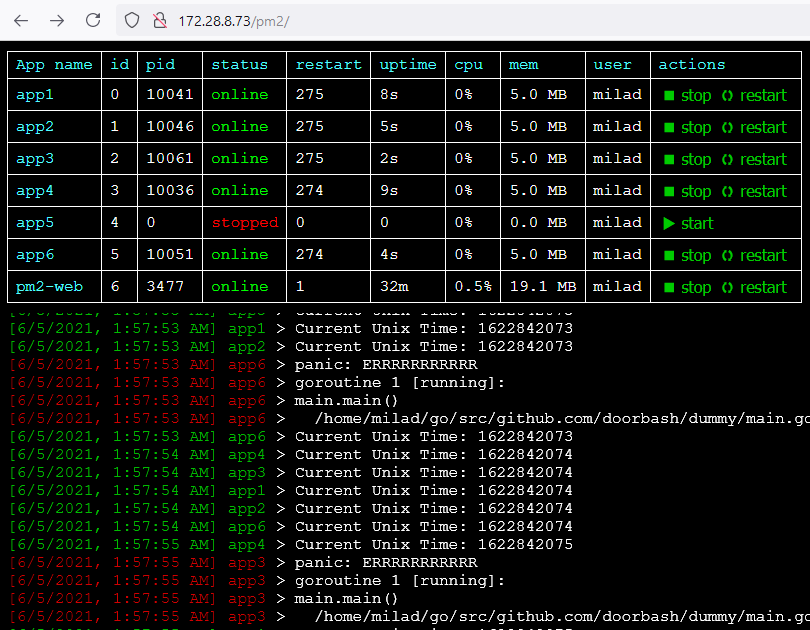
A simple web based monitor for PM2
Build
go build
Usage
./pm2-web [OPTIONS] address
Options:
 -u, --username= BasicAuth username
 -p, --password= BasicAuth password
 -l, --log-buffer-size= Log buffer size (default: 200)
 -i, --interval= PM2 process-list update interval in seconds (default: 10)
 --time Show log time
 --app-id Show app id
 --app-name Show app name
 --actions Show start, stop and restart buttons
Example
Run without authentication:
./pm2-web --time --app-name --actions localhost:3030
or using PM2:
pm2 start --name pm2-web ./pm2-web -- --time --app-name --actions localhost:3030
Run with authentication:
./pm2-web -u admin -p 1234 --time --app-name --actions localhost:3030
or using PM2:
pm2 start --name pm2-web ./pm2-web -- -u admin -p 1234 --time --app-name --actions localhost:3030
Run behind reverse proxy:
Nginx configuration:
server {
 listen 80;
 listen 443 ssl;
 server_name yourdomain.com;

 ssl_certificate /path/to/your/cert.crt;
 ssl_certificate_key /path/to/your/cert.key;

 location /pm2/logs {
 proxy_pass http://127.0.0.1:3030/logs;
 proxy_http_version 1.1;
 proxy_set_header Upgrade $http_upgrade;
 proxy_set_header Connection "Upgrade";
 proxy_set_header Host $host;
 }

 location /pm2/action {
 proxy_pass http://127.0.0.1:3030/action;
 }

 location /pm2/ {
 rewrite ^/pm2/(.*)$ /$1 break;
 proxy_pass http://127.0.0.1:3030;
 proxy_set_header Host $host;
 }

 location /pm2 {
 rewrite ^/pm2$ /pm2/ redirect;
 }
}
Licecnse
MIT