We gotta talk about AI as a programming tool for the arts
Chris Ashworth is the creator and CEO of QLab, a macOS software package for "cue-based, multimedia playback" which is designed to automate lighting and audio for live theater productions.I recently started following him on TikTok where he posts about his business and theater automation in general - Chris founded the Voxel theater in Baltimore which QLab use as a combined performance venue, teaching hub and research lab (here's a profile of the theater), and the resulting videos offer a fascinating glimpse into a world I know virtually nothing about.
This latest TikTok describes his Claude Opus moment, after he used Claude Code to build a custom lighting design application for a very niche project and put together a useful application in just a few days that he would never have been able to spare the time for otherwise.
Chris works full time in the arts and comes at generative AI from a position of rational distrust. It's interesting to see him working through that tension to acknowledge that there are valuable applications here to build tools for the community he serves.
I have been at least gently skeptical about all this stuff for the last two years. Every time I checked in on it, I thought it was garbage, wasn't interested in it, wasn't useful. [...] But as a programmer, if you hear something like, this is changing programming, it's important to go check it out once in a while. So I went and checked it out a few weeks ago. And it's different. It's astonishing. [...]
One thing I learned in this exercise is that it can't make you a fundamentally better programmer than you already are. It can take a person who is a bad programmer and make them faster at making bad programs. And I think it can take a person who is a good programmer and, from what I've tested so far, make them faster at making good programs. [...] You see programmers out there saying, "I'm shipping code I haven't looked at and don't understand." I'm terrified by that. I think that's awful. But if you're capable of understanding the code that it's writing, and directing, designing, editing, deleting, being quality control on it, it's kind of astonishing. [...]
The positive thing I see here, and I think is worth coming to terms with, is this is an application that I would never have had time to write as a professional programmer. Because the audience is three people. [...] There's no way it was worth it to me to spend my energy of 20 years designing and implementing software for artists to build an app for three people that is this level of polish. And it took me a few days. [...]
I know there are a lot of people who really hate this technology, and in some ways I'm among them. But I think we've got to come to terms with this is a career-changing moment. And I really hate that I'm saying that because I didn't believe it for the last two years. [...] It's like having a room full of power tools. I wouldn't want to send an untrained person into a room full of power tools because they might chop off their fingers. But if someone who knows how to use tools has the option to have both hand tools and a power saw and a power drill and a lathe, there's a lot of work they can do with those tools at a lot faster speed.
Tags: theatre, ai, generative-ai, llms, ai-assisted-programming, tiktok, ai-ethics, coding-agents, claude-code
- Datasette's
Requestobject can now handlemultipart/form-datafile uploads via the new await request.form(files=True) method. I plan to use this for adatasette-filesplugin to support attaching files to rows of data. - The recommended development environment for hacking on Datasette itself now uses uv. Crucially, you can clone Datasette and run
uv run pytestto run the tests without needing to manually create a virtual environment or install dependencies first, thanks to the dev dependency group pattern. - A new
?_extra=render_cellparameter for both table and row JSON pages to return the results of executing the render_cell() plugin hook. This should unlock new JavaScript UI features in the future.
More details in the release notes. I also invested a bunch of work in eliminating flaky tests that were intermittently failing in CI - I think those are all handled now.
Tags: projects, python, datasette, annotated-release-notes, uv
My blog uses aggressive caching: it sits behind Cloudflare with a 15 minute cache header, which guarantees it can survive even the largest traffic spike to any given page. I've recently added a couple of dynamic features that work in spite of that full-page caching. Here's how those work.
Edit links that are visible only to me
This is a Django site and I manage it through the Django admin.
I have four types of content - entries, link posts (aka blogmarks), quotations and notes. Each of those has a different model and hence a different Django admin area.
I wanted an "edit" link on the public pages that was only visible to me.
The button looks like this:

I solved conditional display of this button with localStorage. I have a tiny bit of JavaScript which checks to see if the localStorage key ADMIN is set and, if it is, displays an edit link based on a data attribute:
document.addEventListener('DOMContentLoaded', () => {
 if (window.localStorage.getItem('ADMIN')) {
 document.querySelectorAll('.edit-page-link').forEach(el => {
 const url = el.getAttribute('data-admin-url');
 if (url) {
 const a = document.createElement('a');
 a.href = url;
 a.className = 'edit-link';
 a.innerHTML = '<svg>...</svg> Edit';
 el.appendChild(a);
 el.style.display = 'block';
 }
 });
 }
});
If you want to see my edit links you can run this snippet of JavaScript:
localStorage.setItem('ADMIN', '1');
My Django admin dashboard has a custom checkbox I can click to turn this option on and off in my own browser:

Random navigation within a tag
Those admin edit links are a very simple pattern. A more interesting one is a feature I added recently for navigating randomly within a tag.
Here's an animated GIF showing those random tag navigations in action (try it here):

On any of my blog's tag pages you can click the "Random" button to bounce to a random post with that tag. That random button then persists in the header of the page and you can click it to continue bouncing to random items in that same tag.
A post can have multiple tags, so there needs to be a little bit of persistent magic to remember which tag you are navigating and display the relevant button in the header.
Once again, this uses localStorage. Any click to a random button records both the tag and the current timestamp to the random_tag key in localStorage before redirecting the user to the /random/name-of-tag/ page, which selects a random post and redirects them there.
Any time a new page loads, JavaScript checks if that random_tag key has a value that was recorded within the past 5 seconds. If so, that random button is appended to the header.
This means that, provided the page loads within 5 seconds of the user clicking the button, the random tag navigation will persist on the page.
You can see the code for that here.
And the prompts
I built the random tag feature entirely using Claude Code for web, prompted from my iPhone. I started with the /random/TAG/ endpoint (full transcript):
Build /random/TAG/ - a page which picks a random post (could be an entry or blogmark or note or quote) that has that tag and sends a 302 redirect to it, marked as no-cache so Cloudflare does not cache it
Use a union to build a list of every content type (a string representing the table out of the four types) and primary key for every item tagged with that tag, then order by random and return the first one
Then inflate the type and ID into an object and load it and redirect to the URL
Include tests - it should work by setting up a tag with one of each of the content types and then running in a loop calling that endpoint until it has either returned one of each of the four types or it hits 1000 loops at which point fail with an error
Then:
I do not like that solution, some of my tags have thousands of items
Can we do something clever with a CTE?
Here's the something clever with a CTE solution we ended up with.
For the "Random post" button (transcript):
Look at most recent commit, then modify the /tags/xxx/ page to have a "Random post" button which looks good and links to the /random/xxx/ page
Then:
Put it before not after the feed icon. It should only display if a tag has more than 5 posts
And finally, the localStorage implementation that persists a random tag button in the header (transcript):
Review the last two commits. Make it so clicking the Random button on a tag page sets a localStorage value for random_tag with that tag and a timestamp. On any other page view that uses the base item template add JS that checks for that localStorage value and makes sure the timestamp is within 5 seconds. If it is within 5 seconds it adds a "Random name-of-tag" button to the little top navigation bar, styled like the original Random button, which bumps the localStorage timestamp and then sends the user to /random/name-of-tag/ when they click it. In this way clicking "Random" on a tag page will send the user into an experience where they can keep clicking to keep surfing randomly in that topic.
Tags: caching, django, javascript, localstorage, ai, cloudflare, generative-ai, llms, ai-assisted-programming
The Five Levels: from Spicy Autocomplete to the Dark Factory
Dan Shapiro proposes a five level model of AI-assisted programming, inspired by the five (or rather six, it's zero-indexed) levels of driving automation.- Spicy autocomplete, aka original GitHub Copilot or copying and pasting snippets from ChatGPT.
- The coding intern, writing unimportant snippets and boilerplate with full human review.
- The junior developer, pair programming with the model but still reviewing every line.
- The developer. Most code is generated by AI, and you take on the role of full-time code reviewer.
- The engineering team. You're more of an engineering manager or product/program/project manager. You collaborate on specs and plans, the agents do the work.
- The dark software factory, like a factory run by robots where the lights are out because robots don't need to see.
Dan says about that last category:
At level 5, it's not really a car any more. You're not really running anybody else's software any more. And your software process isn't really a software process any more. It's a black box that turns specs into software.
Why Dark? Maybe you've heard of the Fanuc Dark Factory, the robot factory staffed by robots. It's dark, because it's a place where humans are neither needed nor welcome.
I know a handful of people who are doing this. They're small teams, less than five people. And what they're doing is nearly unbelievable -- and it will likely be our future.
I've talked to one team that's doing the pattern hinted at here. It was fascinating. The key characteristics:
- Nobody reviews AI-produced code, ever. They don't even look at it.
- The goal of the system is to prove that the system works. A huge amount of the coding agent work goes into testing and tooling and simulating related systems and running demos.
- The role of the humans is to design that system - to find new patterns that can help the agents work more effectively and demonstrate that the software they are building is robust and effective.
It was a tiny team and they stuff they had built in just a few months looked very convincing to me. Some of them had 20+ years of experience as software developers working on systems with high reliability requirements, so they were not approaching this from a naive perspective.
I'm hoping they come out of stealth soon because I can't really share more details than this.
Tags: ai, generative-ai, llms, ai-assisted-programming, coding-agents
One Human + One Agent = One Browser From Scratch
embedding-shapes was so infuriated by the hype around Cursor's FastRender browser project - thousands of parallel agents producing ~1.6 million lines of Rust - that they were inspired to take a go at building a web browser using coding agents themselves.The result is one-agent-one-browser and it's really impressive. Over three days they drove a single Codex CLI agent to build 20,000 lines of Rust that successfully renders HTML+CSS with no Rust crate dependencies at all - though it does (reasonably) use Windows, macOS and Linux system frameworks for image and text rendering.
I installed the 1MB macOS binary release and ran it against my blog:
chmod 755 ~/Downloads/one-agent-one-browser-macOS-ARM64
~/Downloads/one-agent-one-browser-macOS-ARM64 https://simonwillison.net/
Here's the result:

It even rendered my SVG feed subscription icon! A PNG image is missing from the page, which looks like an intermittent bug (there's code to render PNGs).
The code is pretty readable too - here's the flexbox implementation.
I had thought that "build a web browser" was the ideal prompt to really stretch the capabilities of coding agents - and that it would take sophisticated multi-agent harnesses (as seen in the Cursor project) and millions of lines of code to achieve.
Turns out one agent driven by a talented engineer, three days and 20,000 lines of Rust is enough to get a very solid basic renderer working!
I'm going to upgrade my prediction for 2029: I think we're going to get a production-grade web browser built by a small team using AI assistance by then.
Via Show Hacker News
Tags: browsers, predictions, ai, rust, generative-ai, llms, ai-assisted-programming, coding-agents, codex-cli, browser-challenge
Kimi K2.5: Visual Agentic Intelligence
Kimi K2 landed in July as a 1 trillion parameter open weight LLM. It was joined by Kimi K2 Thinking in November which added reasoning capabilities. Now they've made it multi-modal: the K2 models were text-only, but the new 2.5 can handle image inputs as well:Kimi K2.5 builds on Kimi K2 with continued pretraining over approximately 15T mixed visual and text tokens. Built as a native multimodal model, K2.5 delivers state-of-the-art coding and vision capabilities and a self-directed agent swarm paradigm.
The "self-directed agent swarm paradigm" claim there means improved long-sequence tool calling and training on how to break down tasks for multiple agents to work on at once:
For complex tasks, Kimi K2.5 can self-direct an agent swarm with up to 100 sub-agents, executing parallel workflows across up to 1,500 tool calls. Compared with a single-agent setup, this reduces execution time by up to 4.5x. The agent swarm is automatically created and orchestrated by Kimi K2.5 without any predefined subagents or workflow.
I used the OpenRouter Chat UI to have it "Generate an SVG of a pelican riding a bicycle", and it did quite well:

As a more interesting test, I decided to exercise the claims around multi-agent planning with this prompt:
I want to build a Datasette plugin that offers a UI to upload files to an S3 bucket and stores information about them in a SQLite table. Break this down into ten tasks suitable for execution by parallel coding agents.
Here's the full response. It produced ten realistic tasks and reasoned through the dependencies between them. For comparison here's the same prompt against Claude Opus 4.5 and against GPT-5.2 Thinking.
The Hugging Face repository is 595GB. The model uses Kimi's janky "modified MIT" license, which adds the following clause:
Our only modification part is that, if the Software (or any derivative works thereof) is used for any of your commercial products or services that have more than 100 million monthly active users, or more than 20 million US dollars (or equivalent in other currencies) in monthly revenue, you shall prominently display "Kimi K2.5" on the user interface of such product or service.
Given the model's size, I expect one way to run it locally would be with MLX and a pair of $10,000 512GB RAM M3 Ultra Mac Studios. That setup has been demonstrated to work with previous trillion parameter K2 models.
Via Hacker News
Tags: ai, llms, hugging-face, vision-llms, llm-tool-use, ai-agents, pelican-riding-a-bicycle, llm-release, ai-in-china, moonshot, parallel-agents, kimi, janky-licenses
Someone asked on Hacker News if I had any tips for getting coding agents to write decent quality tests. Here's what I said:
I work in Python which helps a lot because there are a TON of good examples of pytest tests floating around in the training data, including things like usage of fixture libraries for mocking external HTTP APIs and snapshot testing and other neat patterns.
Or I can say "use pytest-httpx to mock the endpoints" and Claude knows what I mean.
Keeping an eye on the tests is important. The most common anti-pattern I see is large amounts of duplicated test setup code - which isn't a huge deal, I'm much more more tolerant of duplicated logic in tests than I am in implementation, but it's still worth pushing back on.
"Refactor those tests to use pytest.mark.parametrize" and "extract the common setup into a pytest fixture" work really well there.
Generally though the best way to get good tests out of a coding agent is to make sure it's working in a project with an existing test suite that uses good patterns. Coding agents pick the existing patterns up without needing any extra prompting at all.
I find that once a project has clean basic tests the new tests added by the agents tend to match them in quality. It's similar to how working on large projects with a team of other developers work - keeping the code clean means when people look for examples of how to write a test they'll be pointed in the right direction.
One last tip I use a lot is this:
Clone datasette/datasette-enrichments
from GitHub to /tmp and imitate the
testing patterns it uses
I do this all the time with different existing projects I've written - the quickest way to show an agent how you like something to be done is to have it look at an example.
Tags: testing, coding-agents, python, generative-ai, ai, llms, hacker-news, pytest
One of my favourite features of ChatGPT is its ability to write and execute code in a container. This feature launched as ChatGPT Code Interpreter nearly three years ago, was half-heartedly rebranded to "Advanced Data Analysis" at some point and is generally really difficult to find detailed documentation about. Case in point: it appears to have had a massive upgrade at some point in the past few months, and I can't find documentation about the new capabilities anywhere!
Here are the most notable new features:
- ChatGPT can directly run Bash commands now. Previously it was limited to Python code only, although it could run shell commands via the Python
subprocessmodule. - It has Node.js and can run JavaScript directly in addition to Python. I also got it to run "hello world" in Ruby, Perl, PHP, Go, Java, Swift, Kotlin, C and C++. No Rust yet though!
- While the container still can't make outbound network requests,
pip install packageandnpm install packageboth work now via a custom proxy mechanism. - ChatGPT can locate the URL for a file on the web and use a
container.downloadtool to download that file and save it to a path within the sandboxed container.
This is a substantial upgrade! ChatGPT can now write and then test code in 10 new languages (11 if you count Bash), can find files online and download them into the container, and can install additional packages via pip and npm to help it solve problems.
(OpenAI really need to develop better habits at keeping their release notes up-to-date!)
I was initially suspicious that maybe I'd stumbled into a new preview feature that wasn't available to everyone, but I tried some experiments in a free ChatGPT account and confirmed that the new features are available there as well.
- container.download
- Is container.download a data exfiltration vulnerability?
- Bash and other languages
- Installing packages from pip and npm
- Adding it all together
container.download
My first clue to the new features came the other day when I got curious about Los Angeles air quality, in particular has the growing number of electric vehicles there had a measurable impact?
I prompted a fresh GPT-5.2 Thinking session with:
Show me Los Angeles air quality over time for last 20 years
Here's the shared transcript. Annoyingly that doesn't make the thinking trace available, so here's a screenshot:

This bit instantly caught my eye:
[...] The URL from the error message leads to an Excel file containing air quality trends. I can use the container.download tool to fetch it. [...]
What's container.download? I asked ChatGPT:
Without running any searches tell me about your container.download tool
And got back:
Sure.
container.downloadis a built-in tool I can call that fetches a file from a URL and saves it into the sandboxed container filesystem for this chat session.What it does
- Takes a publicly reachable URL and a destination filepath in the container.
- Downloads the bytes from that URL and writes them to the given path.
- After that, I can read/process the file locally in the container (e.g., unzip it, parse it with Python, open it as an image, convert it, etc.).
Signature (inputs)
It's called like this (conceptually):
{
 "url": "https://example.com/somefile.zip",
 "filepath": "/mnt/data/somefile.zip"
}
Further experimentation confirmed that container.download behaves as described.
I had it download one file from a server with logs enabled and captured the IP address and user-agent. Here are the most interesting headers:
User-Agent: Mozilla/5.0 AppleWebKit/537.36 (KHTML, like Gecko); compatible; ChatGPT-User/1.0; +https://openai.com/bot
Accept: text/html, application/xhtml+xml, application/xml;q=0.9, image/avif, image/webp, image/apng, */*;q=0.8, application/signed-exchange;v=b3;q=0.9
Cf-Connecting-Ip: 52.230.164.178
That 52.230.164.178 IP address resolves to Microsoft Azure Cloud (centralus) in Des Moines, Iowa.
Is container.download a data exfiltration vulnerability?
On the one hand, this is really useful! ChatGPT can navigate around websites looking for useful files, download those files to a container and then process them using Python or other languages.
Is this a data exfiltration vulnerability though? Could a prompt injection attack trick ChatGPT into leaking private data out to a container.download call to a URL with a query string that includes sensitive information?
I don't think it can. I tried getting it to assemble a URL with a query string and access it using container.download and it couldn't do it. It told me that it got back this error:
ERROR: download failed because url not viewed in conversation before. open the file or url using web.run first.
This looks to me like the same safety trick used by Claude's Web Fetch tool: only allow URL access if that URL was either directly entered by the user or if it came from search results that could not have been influenced by a prompt injection.
(I poked at this a bit more and managed to get a simple constructed query string to pass through web.run - a different tool entirely - but when I tried to compose a longer query string containing the previous prompt history a web.run filter blocked it.)
So I think this is all safe, though I'm curious if it could hold firm against a more aggressive round of attacks from a seasoned security researcher.
Bash and other languages
The key lesson from coding agents like Claude Code and Codex CLI is that Bash rules everything: if an agent can run Bash commands in an environment it can do almost anything that can be achieved by typing commands into a computer.
When Anthropic added their own code interpreter feature to Claude last September they built that around Bash rather than just Python. It looks to me like OpenAI have now done the same thing for ChatGPT.
Here's what ChatGPT looks like when it runs a Bash command - here my prompt was:
npm install a fun package and demonstrate using it

It's useful to click on the "Thinking" or "Thought for 32s" links as that opens the Activity sidebar with a detailed trace of what ChatGPT did to arrive at its answer. This helps guard against cheating - ChatGPT might claim to have run Bash in the main window but it can't fake those black and white logs in the Activity panel.
I had it run Hello World in various languages later in that same session.

Installing packages from pip and npm
In the previous example ChatGPT installed the cowsay package from npm and used it to draw an ASCII-art cow. But how could it do that if the container can't make outbound network requests?
In another session I challenged it to explore its environment. and figure out how that worked.
Here's the resulting Markdown report it created.
The key magic appears to be a applied-caas-gateway1.internal.api.openai.org proxy, available within the container and with various packaging tools configured to use it.
The following environment variables cause pip and uv to install packages from that proxy instead of directly from PyPI:
PIP_INDEX_URL=https://reader:****@packages.applied-caas-gateway1.internal.api.openai.org/.../pypi-public/simple
PIP_TRUSTED_HOST=packages.applied-caas-gateway1.internal.api .openai.org
UV_INDEX_URL=https://reader:****@packages.applied-caas-gatew ay1.internal.api.openai.org/.../pypi-public/simple
UV_INSECURE_HOST=https://packages.applied-caas-gateway1.inte rnal.api.openai.org
This one appears to get npm to work:
NPM_CONFIG_REGISTRY=https://reader:****@packages.applied-caas-gateway1.internal.api.openai.org/.../npm-public
And it reported these suspicious looking variables as well:
CAAS_ARTIFACTORY_BASE_URL=packages.applied-caas-gateway1.internal.api.openai.org
CAAS_ARTIFACTORY_PYPI_REGISTRY=.../artifactory/api/pypi/pypi -public
CAAS_ARTIFACTORY_NPM_REGISTRY=.../artifactory/api/npm/npm-pu blic
CAAS_ARTIFACTORY_GO_REGISTRY=.../artifactory/api/go/golang-m ain
CAAS_ARTIFACTORY_MAVEN_REGISTRY=.../artifactory/maven-public
CAAS_ARTIFACTORY_GRADLE_REGISTRY=.../artifactory/gradle-publ ic
CAAS_ARTIFACTORY_CARGO_REGISTRY=.../artifactory/api/cargo/ca rgo-public/index
CAAS_ARTIFACTORY_DOCKER_REGISTRY=.../dockerhub-public
CAAS_ARTIFACTORY_READER_USERNAME=reader
CAAS_ARTIFACTORY_READER_PASSWORD=****
NETWORK=caas_packages_only
Neither Rust nor Docker are installed in the container environment, but maybe those registry references are a clue of features still to come.
Adding it all together
The result of all of this? You can tell ChatGPT to use Python or Node.js packages as part of a conversation and it will be able to install them and apply them against files you upload or that it downloads from the public web. That's really cool.
The big missing feature here should be the easiest to provide: we need official documentation! A release notes entry would be a good start, but there are a lot of subtle details to how this new stuff works, its limitations and what it can be used for.
As always, I'd also encourage OpenAI to come up with a name for this set of features that properly represents how it works and what it can do.
In the meantime, I'm going to call this ChatGPT Containers.
Update: a full list of tools
I decided to ask ChatGPT about other tools that were available to it in case there was anything interesting in there:
List all tools that are available to you, with their exact names and descriptions and signatures
Here's what I got back.
List of ChatGPT tools according to GPT-5.2 Thinking on 26th January 2026
Below are all tools available to me in this chat, with their exact names, descriptions, and signatures (as defined in my tool interface).
python
python.exec (FREEFORM) - any
Description: Execute Python code in a Jupyter environment for private/internal reasoning (not shown to you). Internet access is disabled.
Signature: python.exec(FREEFORM) -> any
web
web.run (ToolCallV5 JSON) - any
Description: Access the internet and specialized lookups (search, open/click/find pages, screenshot PDFs, image search, product search, finance, weather, sports, calculator, time). Supports citations via returned turn... reference IDs.
Signature:
web.run({ open?, click?, find?, screenshot?, image_query?, product_query?, sports?, finance?, weather?, calculator?, time?, search_query?, response_length? }) -> any
automations
automations.create - any
Description: Schedule a future/recurring task/reminder/search via iCal VEVENT.
Signature:
automations.create({ prompt: string, title: string, schedule?: string, dtstart_offset_json?: string }) -> any
automations.update - any
Description: Modify an existing scheduled task.
Signature:
automations.update({ jawbone_id: string, schedule?: string, dtstart_offset_json?: string, prompt?: string, title?: string, is_enabled?: boolean }) -> any
automations.list - any
Description: List existing automations.
Signature: automations.list() -> any
guardian_tool
guardian_tool.get_policy - str
Description: Retrieve policy guidance for specific categories (currently: election_voting).
Signature: guardian_tool.get_policy({ category: string }) -> str
file_search
file_search.msearch - any
Description: Search across available internal/connected sources (in this environment: primarily "recording_knowledge" transcripts when relevant).
Signature:
file_search.msearch({ queries?: string[], source_filter?: string[], file_type_filter?: string[], intent?: string, time_frame_filter?: { start_date?: string, end_date?: string } }) -> any
file_search.mclick - any
Description: Expand/open previously returned search results (or connector URLs) for more context.
Signature:
file_search.mclick({ pointers?: string[], start_date?: string, end_date?: string }) -> any
gmail (read-only)
gmail.search_email_ids - any
Description: Search Gmail message IDs by query/tags (read-only).
Signature:
gmail.search_email_ids({ query?: string, tags?: string[], max_results?: integer, next_page_token?: string }) -> any
gmail.batch_read_email - any
Description: Read a batch of Gmail messages by message IDs (read-only).
Signature:
gmail.batch_read_email({ message_ids: string[] }) -> any
gcal (read-only)
gcal.search_events - any
Description: Search Google Calendar events in a time range and/or by keyword (read-only).
Signature:
gcal.search_events({ time_min?: string, time_max?: string, timezone_str?: string, max_results?: integer, query?: string, calendar_id?: string, next_page_token?: string }) -> any
gcal.read_event - any
Description: Read a specific calendar event by ID (read-only).
Signature:
gcal.read_event({ event_id: string, calendar_id?: string }) -> any
gcontacts (read-only)
gcontacts.search_contacts - any
Description: Search Google Contacts by keyword (read-only).
Signature:
gcontacts.search_contacts({ query: string, max_results?: integer }) -> any
canmore (canvas)
canmore.create_textdoc - any
Description: Create a new canvas text document (markdown or code).
Signature:
canmore.create_textdoc({ name: string, type: "document" | "code/bash" | "code/zsh" | "code/javascript" | "code/typescript" | "code/html" | "code/css" | "code/python" | "code/json" | "code/sql" | "code/go" | "code/yaml" | "code/java" | "code/rust" | "code/cpp" | "code/swift" | "code/php" | "code/xml" | "code/ruby" | "code/haskell" | "code/kotlin" | "code/csharp" | "code/c" | "code/objectivec" | "code/r" | "code/lua" | "code/dart" | "code/scala" | "code/perl" | "code/commonlisp" | "code/clojure" | "code/ocaml" | "code/powershell" | "code/verilog" | "code/dockerfile" | "code/vue" | "code/react" | "code/other", content: string }) -> any
canmore.update_textdoc - any
Description: Apply regex-based edits to the current canvas textdoc.
Signature:
canmore.update_textdoc({ updates: { pattern: string, multiple?: boolean, replacement: string }[] }) -> any
canmore.comment_textdoc - any
Description: Add actionable comments on matched regions of the current canvas textdoc.
Signature:
canmore.comment_textdoc({ comments: { pattern: string, comment: string }[] }) -> any
python_user_visible
python_user_visible.exec (FREEFORM) - any
Description: Execute Python code that you will see (tables, plots, generated files). Internet disabled.
Signature: python_user_visible.exec(FREEFORM) -> any
user_info
user_info.get_user_info - any
Description: Get your current location and local time (or UTC if unknown).
Signature: user_info.get_user_info({}) -> any
summary_reader
summary_reader.read - any
Description: Read safe-to-share internal reasoning summaries from earlier turns (used when asked how I arrived at something).
Signature: summary_reader.read({ limit?: integer, offset?: integer }) -> any
container
container.exec - any
Description: Run a command inside the container and return stdout/stderr.
Signature:
container.exec({ cmd: string[], session_name?: string | null, workdir?: string | null, timeout?: integer | null, env?: object | null, user?: string | null }) -> any
container.feed_chars - any
Description: Send input to a running interactive exec session and flush output.
Signature:
container.feed_chars({ session_name: string, chars: string, yield_time_ms?: integer }) -> any
container.open_image - any
Description: Display an image from an absolute path in the container (jpg/jpeg/png/webp).
Signature:
container.open_image({ path: string, user?: string | null }) -> any
container.download - any
Description: Download a file from a URL into the container filesystem.
Signature:
container.download({ url: string, filepath: string }) -> any
bio (memory)
bio.update (FREEFORM) - any
Description: Persist (or forget) user-specific info across conversations ("memory").
Signature: bio.update(FREEFORM) -> any
api_tool
api_tool.list_resources - any
Description: List available "resources" (including invokable tools) in an OP-style file tree.
Signature:
api_tool.list_resources({ path?: string, cursor?: string | null, only_tools?: boolean, refetch_tools?: boolean }) -> any
api_tool.call_tool - any
Description: Invoke a resource as a tool (must know its full path/URI from list_resources).
Signature:
api_tool.call_tool({ path: string, args: object }) -> any
personal_context
personal_context.search - any
Description: Retrieve user-specific context from prior interactions/linked sources to maintain continuity.
Signature:
personal_context.search({ query: string }) -> any
image_gen
image_gen.text2im - any
Description: Generate or edit images from text instructions (and optionally referenced image IDs).
Signature:
image_gen.text2im({ prompt?: string | null, size?: string | null, n?: integer | null, transparent_background?: boolean | null, is_style_transfer?: boolean | null, referenced_image_ids?: string[] | null }) -> any
user_settings
user_settings.get_user_settings - any
Description: Read current settings and allowed values (personality, accent color, appearance).
Signature: user_settings.get_user_settings() -> any
user_settings.set_setting - any
Description: Change one setting (accent color, appearance, or personality) to an allowed value.
Signature:
user_settings.set_setting({ setting_name: "accent_color" | "appearance" | "personality", setting_value: string }) -> any
artifact_handoff
artifact_handoff.prepare_artifact_generation - any
Description: Must be called immediately when the user asks for a spreadsheet or slide deck artifact.
Signature: artifact_handoff.prepare_artifact_generation() -> any
Tags: pypi, sandboxing, npm, ai, openai, generative-ai, chatgpt, llms, ai-assisted-programming, code-interpreter
This got me thinking about the browser. Over the last 30 years, we have built a sandbox specifically designed to run incredibly hostile, untrusted code from anywhere on the web, the instant a user taps a URL. [...]
Could you build something like Cowork in the browser? Maybe. To find out, I built a demo called Co-do that tests this hypothesis. In this post I want to discuss the research I've done to see how far we can get, and determine if the browser's ability to run untrusted code is useful (and good enough) for enabling software to do more for us directly on our computer.
Paul then describes how the three key aspects of a sandbox - filesystem, network access and safe code execution - can be handled by browser technologies: the File System Access API (still Chrome-only as far as I can tell), CSP headers with <iframe sandbox> and WebAssembly in Web Workers.
Co-do is a very interesting demo that illustrates all of these ideas in a single application:
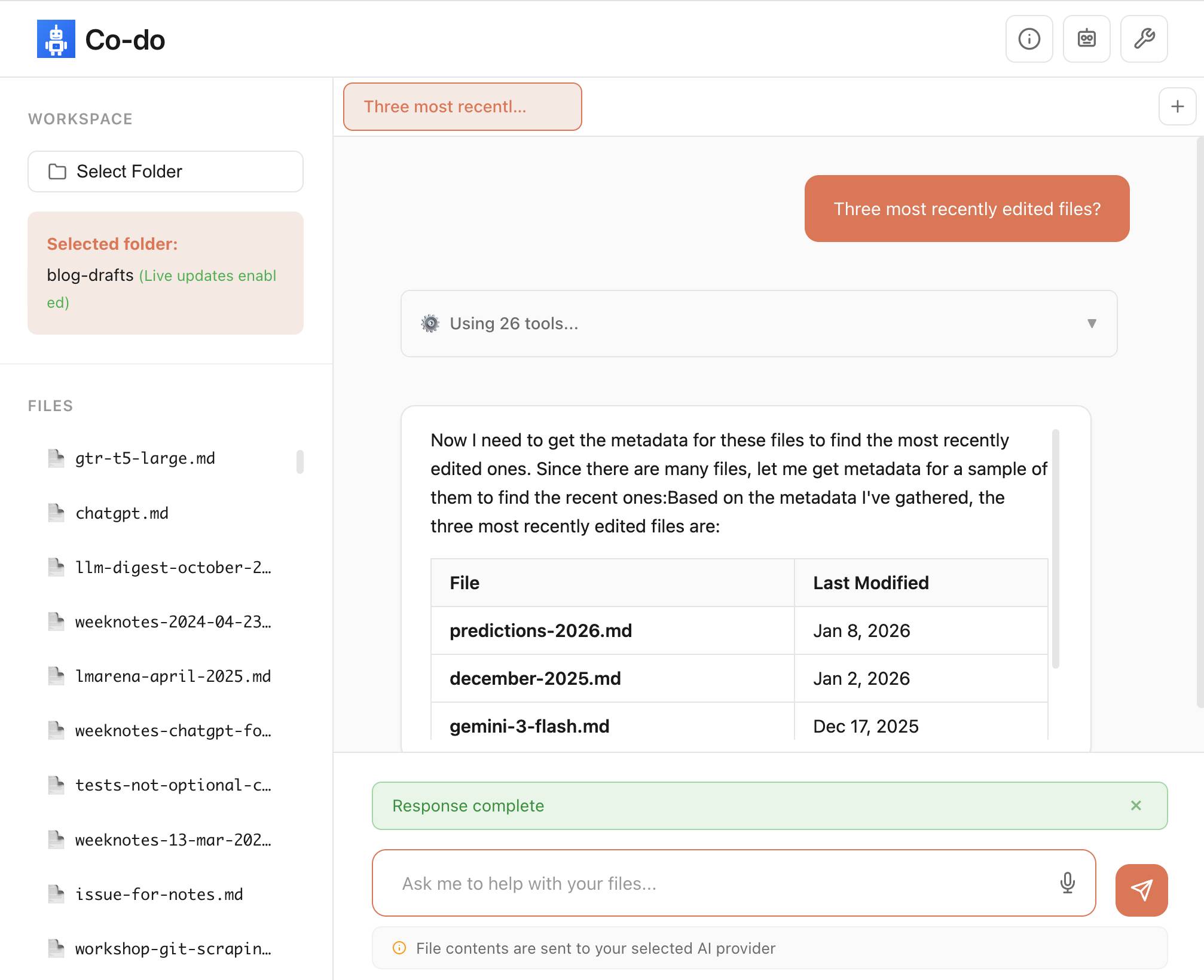
You select a folder full of files and configure an LLM provider and set an API key, Co-do then uses CSP-approved API calls to interact with that provider and provides a chat interface with tools for interacting with those files. It does indeed feel similar to Claude Cowork but without running a multi-GB local container to provide the sandbox.
My biggest complaint about <iframe sandbox> remains how thinly documented it is, especially across different browsers. Paul's post has all sorts of useful details on that which I've not encountered elsewhere, including a complex double-iframe technique to help apply network rules to the inner of the two frames.
Thanks to this post I also learned about the <input type="file" webkitdirectory> tag which turns out to work on Firefox, Safari and Chrome and allows a browser read-only access to a full directory of files at once. I had Claude knock up a webkitdirectory demo to try it out and I'll certainly be using it for projects in the future.

Tags: browsers, javascript, sandboxing, ai, generative-ai, llms, ai-agents, coding-agents, claude-code
Kakapo Cam: Rakiura live stream
Critical update for this year's Kakapo breeding season: the New Zealand Department of Conservation have a livestream running of Rakiura's nest!You're looking at the underground nest of 23-year-old Rakiura. She has chosen this same site to nest for all seven breeding seasons since 2008, a large cavity under a rata tree. Because she returns to the site so reliably, we've been able to make modifications over the years to keep it safe and dry, including adding a well-placed hatch for monitoring eggs and chicks.
Rakiura is a legendary Kakapo:
Rakiura hatched on 19 February 2002 on Whenua Hou/Codfish Island. She is the offspring of Flossie and Bill. Her name comes from the te reo Maori name for Stewart Island, the place where most of the founding kakapo population originated.
Rakiura has nine living descendants, three females and six males, across six breeding seasons. In 2008 came Toitiiti, in 2009 Tamahou and Te Atapo, in 2011 Tia and Tutoko, in 2014 Taeatanga and Te Awa, in 2019 Mati-ma and Tautahi. She also has many grandchicks.
She laid her first egg of the season at 4:30pm NZ time on 22nd January. The livestream went live shortly afterwards, once she committed to this nest.
The stream is on YouTube. I used Claude Code to write a livestream-gif.py script and used that to capture this sped-up video of the last few hours of footage, within which you can catch a glimpse of the egg!
Via MetaFilter
Tags: youtube, kakapo, conservation, claude-code

Jenny argues that the Design Process - user research leading to personas leading to user journeys leading to wireframes... all before anything gets built - may be outdated for today's world.
Hypothesis: In a world where anyone can make anything -- what matters is your ability to choose and curate what you make.
In place of the Process, designers should lean into prototypes. AI makes these much more accessible and less time-consuming than they used to be.
Watching this talk made me think about how AI-assisted programming significantly reduces the cost of building the wrong thing. Previously if the design wasn't right you could waste months of development time building in the wrong direction, which was a very expensive mistake. If a wrong direction wastes just a few days instead we can take more risks and be much more proactive in exploring the problem space.
I've always been a compulsive prototyper though, so this is very much playing into my own existing biases!
Via @jenny_wen
Tags: design, prototyping, ai, generative-ai, llms, ai-assisted-programming, vibe-coding
If you tell a friend they can now instantly create any app, they'll probably say "Cool! Now I need to think of an idea." Then they will forget about it, and never build a thing. The problem is not that your friend is horribly uncreative. It's that most people's problems are not software-shaped, and most won't notice even when they are. [...]
Programmers are trained to see everything as a software-shaped problem: if you do a task three times, you should probably automate it with a script. Rename every IMG_*.jpg file from the last week to hawaii2025_*.jpg, they tell their terminal, while the rest of us painfully click and copy-paste. We are blind to the solutions we were never taught to see, asking for faster horses and never dreaming of cars.
Tags: vibe-coding, coding-agents, claude-code, generative-ai, ai, llms
Last week Cursor published Scaling long-running autonomous coding, an article describing their research efforts into coordinating large numbers of autonomous coding agents. One of the projects mentioned in the article was FastRender, a web browser they built from scratch using their agent swarms. I wanted to learn more so I asked Wilson Lin, the engineer behind FastRender, if we could record a conversation about the project. That 47 minute video is now available on YouTube. I've included some of the highlights below.
See my previous post for my notes and screenshots from trying out FastRender myself.
What FastRender can do right now
We started the conversation with a demo of FastRender loading different pages (03:15). The JavaScript engine isn't working yet so we instead loaded github.com/wilsonzlin/fastrender, Wikipedia and CNN - all of which were usable, if a little slow to display.
JavaScript had been disabled by one of the agents, which decided to add a feature flag! 04:02
JavaScript is disabled right now. The agents made a decision as they were currently still implementing the engine and making progress towards other parts... they decided to turn it off or put it behind a feature flag, technically.
From side-project to core research
Wilson started what become FastRender as a personal side-project to explore the capabilities of the latest generation of frontier models - Claude Opus 4.5, GPT-5.1, and GPT-5.2. 00:56
FastRender was a personal project of mine from, I'd say, November. It was an experiment to see how well frontier models like Opus 4.5 and back then GPT-5.1 could do with much more complex, difficult tasks.
A browser rendering engine was the ideal choice for this, because it's both extremely ambitious and complex but also well specified. And you can visually see how well it's working! 01:57
As that experiment progressed, I was seeing better and better results from single agents that were able to actually make good progress on this project. And at that point, I wanted to see, well, what's the next level? How do I push this even further?
Once it became clear that this was an opportunity to try multiple agents working together it graduated to an official Cursor research project, and available resources were amplified.
The goal of FastRender was never to build a browser to compete with the likes of Chrome. 41:52
We never intended for it to be a production software or usable, but we wanted to observe behaviors of this harness of multiple agents, to see how they could work at scale.
The great thing about a browser is that it has such a large scope that it can keep serving experiments in this space for many years to come. JavaScript, then WebAssembly, then WebGPU... it could take many years to run out of new challenges for the agents to tackle.
Running thousands of agents at once
The most interesting thing about FastRender is the way the project used multiple agents working in parallel to build different parts of the browser. I asked how many agents were running at once: 05:24
At the peak, when we had the stable system running for one week continuously, there were approximately 2,000 agents running concurrently at one time. And they were making, I believe, thousands of commits per hour.
The project has nearly 30,000 commits!
How do you run 2,000 agents at once? They used really big machines. 05:56
The simple approach we took with the infrastructure was to have a large machine run one of these multi-agent harnesses. Each machine had ample resources, and it would run about 300 agents concurrently on each. This was able to scale and run reasonably well, as agents spend a lot of time thinking, and not just running tools.
At this point we switched to a live demo of the harness running on one of those big machines (06:32). The agents are arranged in a tree structure, with planning agents firing up tasks and worker agents then carrying them out. 07:14

This cluster of agents is working towards building out the CSS aspects of the browser, whether that's parsing, selector engine, those features. We managed to push this even further by splitting out the browser project into multiple instructions or work streams and have each one run one of these harnesses on their own machine, so that was able to further parallelize and increase throughput.
But don't all of these agents working on the same codebase result in a huge amount of merge conflicts? Apparently not: 08:21
We've noticed that most commits do not have merge conflicts. The reason is the harness itself is able to quite effectively split out and divide the scope and tasks such that it tries to minimize the amount of overlap of work. That's also reflected in the code structure--commits will be made at various times and they don't tend to touch each other at the same time.
This appears to be the key trick for unlocking benefits from parallel agents: if planning agents do a good enough job of breaking up the work into non-overlapping chunks you can bring hundreds or even thousands of agents to bear on a problem at once.
Surprisingly, Wilson found that GPT-5.1 and GPT-5.2 were a better fit for this work than the coding specialist GPT-5.1-Codex: 17:28
Some initial findings were that the instructions here were more expansive than merely coding. For example, how to operate and interact within a harness, or how to operate autonomously without interacting with the user or having a lot of user feedback. These kinds of instructions we found worked better with the general models.
I asked what the longest they've seen this system run without human intervention: 18:28
So this system, once you give an instruction, there's actually no way to steer it, you can't prompt it, you're going to adjust how it goes. The only thing you can do is stop it. So our longest run, all the runs are basically autonomous. We don't alter the trajectory while executing. [...]
And so the longest at the time of the post was about a week and that's pretty close to the longest. Of course the research project itself was only about three weeks so you know we probably can go longer.
Specifications and feedback loops
An interesting aspect of this project design is feedback loops. For agents to work autonomously for long periods of time they need as much useful context about the problem they are solving as possible, combined with effective feedback loops to help them make decisions.
The FastRender repo uses git submodules to include relevant specifications, including csswg-drafts, tc39-ecma262 for JavaScript, whatwg-dom, whatwg-html and more. 14:06
Feedback loops to the system are very important. Agents are working for very long periods continuously, and without guardrails and feedback to know whether what they're doing is right or wrong it can have a big impact over a long rollout. Specs are definitely an important part--you can see lots of comments in the code base that AI wrote referring specifically to specs that they found in the specs submodules.
GPT-5.2 is a vision-capable model, and part of the feedback loop for FastRender included taking screenshots of the rendering results and feeding those back into the model: 16:23
In the earlier evolution of this project, when it was just doing the static renderings of screenshots, this was definitely a very explicit thing we taught it to do. And these models are visual models, so they do have that ability. We have progress indicators to tell it to compare the diff against a golden sample.
The strictness of the Rust compiler helped provide a feedback loop as well: 15:52
The nice thing about Rust is you can get a lot of verification just from compilation, and that is not as available in other languages.
The agents chose the dependencies
We talked about the Cargo.toml dependencies that the project had accumulated, almost all of which had been selected by the agents themselves.
Some of these, like Skia for 2D graphics rendering or HarfBuzz for text shaping, were obvious choices. Others such as Taffy felt like they might go against the from-scratch goals of the project, since that library implements CSS flexbox and grid layout algorithms directly. This was not an intended outcome. 27:53
Similarly these are dependencies that the agent picked to use for small parts of the engine and perhaps should have actually implemented itself. I think this reflects on the importance of the instructions, because I actually never encoded specifically the level of dependencies we should be implementing ourselves.
The agents vendored in Taffy and applied a stream of changes to that vendored copy. 31:18
It's currently vendored. And as the agents work on it, they do make changes to it. This was actually an artifact from the very early days of the project before it was a fully fledged browser... it's implementing things like the flex and grid layers, but there are other layout methods like inline, block, and table, and in our new experiment, we're removing that completely.
The inclusion of QuickJS despite the presence of a home-grown ecma-rs implementation has a fun origin story: 35:15
I believe it mentioned that it pulled in the QuickJS because it knew that other agents were working on the JavaScript engine, and it needed to unblock itself quickly. [...]
It was like, eventually, once that's finished, let's remove it and replace with the proper engine.
I love how similar this is to the dynamics of a large-scale human engineering team, where you could absolutely see one engineer getting frustrated at another team not having delivered yet and unblocking themselves by pulling in a third-party library.
Intermittent errors are OK, actually
Here's something I found really surprising: the agents were allowed to introduce small errors into the codebase as they worked! 39:42
One of the trade-offs was: if you wanted every single commit to be a hundred percent perfect, make sure it can always compile every time, that might be a synchronization bottleneck. [...]
Especially as you break up the system into more modularized aspects, you can see that errors get introduced, but small errors, right? An API change or some syntax error, but then they get fixed really quickly after a few commits. So there's a little bit of slack in the system to allow these temporary errors so that the overall system can continue to make progress at a really high throughput. [...]
People may say, well, that's not correct code. But it's not that the errors are accumulating. It's a stable rate of errors. [...] That seems like a worthwhile trade-off.
If you're going to have thousands of agents working in parallel optimizing for throughput over correctness turns out to be a strategy worth exploring.
A single engineer plus a swarm of agents in January 2026
The thing I find most interesting about FastRender is how it demonstrates the extreme edge of what a single engineer can achieve in early 2026 with the assistance of a swarm of agents.
FastRender may not be a production-ready browser, but it represents over a million lines of Rust code, written in a few weeks, that can already render real web pages to a usable degree.
A browser really is the ideal research project to experiment with this new, weirdly shaped form of software engineering.
I asked Wilson how much mental effort he had invested in browser rendering compared to agent co-ordination. 11:34
The browser and this project were co-developed and very symbiotic, only because the browser was a very useful objective for us to measure and iterate the progress of the harness. The goal was to iterate on and research the multi-agent harness--the browser was just the research example or objective.
FastRender is effectively using a full browser rendering engine as a "hello world" exercise for multi-agent coordination!
Tags: browsers, youtube, ai, generative-ai, llms, ai-assisted-programming, coding-agents, cursor, parallel-agents, browser-challenge
[...] i was too busy with work to read anything, so i asked chatgpt to summarize some books on state formation, and it suggested circumscription theory. there was already the natural boundary of my computer hemming the towns in, and town mayors played the role of big men to drive conflict. so i just needed a way for them to fight. i slightly tweaked the allocation of claude max accounts to the towns from a demand-based to a fixed allocation system. towns would each get a fixed amount of tokens to start, but i added a soldier role that could attack and defend in raids to steal tokens from other towns. [...]
— Theia Vogel, Gas Town fan fiction
Tags: parallel-agents, llms, ai, generative-ai
ssh simon.exe.dev
Here's the clever bit: when you run the above command exe.dev signs you into your VM of that name... but they don't assign every VM its own IP address and SSH has no equivalent of the Host header, so how does their load balancer know which of your VMs to forward you on to?
The answer is that while they don't assign a unique IP to every VM they do have enough IPs that they can ensure each of your VMs has an IP that is unique to your account.
If I create two VMs they will each resolve to a separate IP address, each of which is shared with many other users. The underlying infrastructure then identifies my user account from my SSH public key and can determine which underlying VM to forward my SSH traffic to.
Via lobste.rs
Qwen3-TTS Family is Now Open Sourced: Voice Design, Clone, and Generation
I haven't been paying much attention to the state-of-the-art in speech generation models other than noting that they've got really good, so I can't speak for how notable this new release from Qwen is.From the accompanying paper:
In this report, we present the Qwen3-TTS series, a family of advanced multilingual, controllable, robust, and streaming text-to-speech models. Qwen3-TTS supports state-of- the-art 3-second voice cloning and description-based control, allowing both the creation of entirely novel voices and fine-grained manipulation over the output speech. Trained on over 5 million hours of speech data spanning 10 languages, Qwen3-TTS adopts a dual-track LM architecture for real-time synthesis [...]. Extensive experiments indicate state-of-the-art performance across diverse objective and subjective benchmark (e.g., TTS multilingual test set, InstructTTSEval, and our long speech test set). To facilitate community research and development, we release both tokenizers and models under the Apache 2.0 license.
To give an idea of size, Qwen/Qwen3-TTS-12Hz-1.7B-Base is 4.54GB on Hugging Face and Qwen/Qwen3-TTS-12Hz-0.6B-Base is 2.52GB.
The Hugging Face demo lets you try out the 0.6B and 1.7B models for free in your browser, including voice cloning:

I tried this out by recording myself reading my about page and then having Qwen3-TTS generate audio of me reading the Qwen3-TTS announcement post. Here's the result:
It's important that everyone understands that voice cloning is now something that's available to anyone with a GPU and a few GBs of VRAM... or in this case a web browser that can access Hugging Face.
Update: Prince Canuma got this working with his mlx-audio library. I had Claude turn that into a CLI tool which you can run with uv ike this:
uv run https://tools.simonwillison.net/python/q3_tts.py \
 'I am a pirate, give me your gold!' \
 -i 'gruff voice' -o pirate.wav
The -i option lets you use a prompt to describe the voice it should use. On first run this downloads a 4.5GB model file from Hugging Face.
Via Hacker News
Tags: text-to-speech, ai, generative-ai, hugging-face, uv, qwen, mlx, prince-canuma, ai-in-china
Most people's mental model of Claude Code is that "it's just a TUI" but it should really be closer to "a small game engine".
For each frame our pipeline constructs a scene graph with React then:
-> layout elements
-> rasterize them to a 2d screen
-> diff that against the previous screen
-> finally use the diff to generate ANSI sequences to drawWe have a ~16ms frame budget so we have roughly ~5ms to go from the React scene graph to ANSI written.
— Chris Lloyd, Claude Code team at Anthropic
Tags: react, claude-code
He called this leak the soul document, and Amanda Askell from Anthropic quickly confirmed that it was indeed part of Claude's training procedures.
Today Anthropic made this official, releasing that full "constitution" document under a CC0 (effectively public domain) license. There's a lot to absorb! It's over 35,000 tokens, more than 10x the length of the published Opus 4.5 system prompt.
One detail that caught my eye is the acknowledgements at the end, which include a list of external contributors who helped review the document. I was intrigued to note that two of the fifteen listed names are Catholic members of the clergy - Father Brendan McGuire is a pastor in Los Altos with a Master's degree in Computer Science and Math and Bishop Paul Tighe is an Irish Catholic bishop with a background in moral theology.
Tags: ai, generative-ai, llms, anthropic, claude, amanda-askell, ai-ethics, ai-personality
Electricity use of AI coding agents
Previous work estimating the energy and water cost of LLMs has generally focused on the cost per prompt using a consumer-level system such as ChatGPT.Simon P. Couch notes that coding agents such as Claude Code use way more tokens in response to tasks, often burning through many thousands of tokens of many tool calls.
As a heavy Claude Code user, Simon estimates his own usage at the equivalent of 4,400 "typical queries" to an LLM, for an equivalent of around $15-$20 in daily API token spend. He figures that to be about the same as running a dishwasher once or the daily energy used by a domestic refrigerator.
Via Hacker News
Tags: ai, generative-ai, llms, ai-ethics, ai-energy-usage, coding-agents, claude-code
Giving University Exams in the Age of Chatbots
Detailed and thoughtful description of an open-book and open-chatbot exam run by Ploum at Ecole Polytechnique de Louvain for an "Open Source Strategies" class.Students were told they could use chatbots during the exam but they had to announce their intention to do so in advance, share their prompts and take full accountability for any mistakes they made.
Only 3 out of 60 students chose to use chatbots. Ploum surveyed half of the class to help understand their motivations.
Via lobste.rs
Tags: education, ai, generative-ai, llms, ai-ethics
A minimal, LLM-friendly programming language with mandatory testing and unambiguous syntax.
NanoLang transpiles to C for native performance while providing a clean, modern syntax optimized for both human readability and AI code generation.
The syntax strikes me as an interesting mix between C, Lisp and Rust.
I decided to see if an LLM could produce working code in it directly, given the necessary context. I started with this MEMORY.md file, which begins:
Purpose: This file is designed specifically for Large Language Model consumption. It contains the essential knowledge needed to generate, debug, and understand NanoLang code. Pair this with
spec.jsonfor complete language coverage.
I ran that using LLM and llm-anthropic like this:
llm -m claude-opus-4.5 \
 -s https://raw.githubusercontent.com/jordanhubbard/nanolang/ref s/heads/main/MEMORY.md \
 'Build me a mandelbrot fractal CLI tool in this language'
 > /tmp/fractal.nano
The resulting code... did not compile.
I may have been too optimistic expecting a one-shot working program for a new language like this. So I ran a clone of the actual project, copied in my program and had Claude Code take a look at the failing compiler output.
... and it worked! Claude happily grepped its way through the various examples/ and built me a working program.
Here's the Claude Code transcript - you can see it reading relevant examples here - and here's the finished code plus its output.
I've suspected for a while that LLMs and coding agents might significantly reduce the friction involved in launching a new language. This result reinforces my opinion.
Via Hacker News
Tags: programming-languages, ai, generative-ai, llms, ai-assisted-programming, llm, coding-agents, claude-code
Scaling long-running autonomous coding
Wilson Lin at Cursor has been doing some experiments to see how far you can push a large fleet of "autonomous" coding agents:This post describes what we've learned from running hundreds of concurrent agents on a single project, coordinating their work, and watching them write over a million lines of code and trillions of tokens.
They ended up running planners and sub-planners to create tasks, then having workers execute on those tasks - similar to how Claude Code uses sub-agents. Each cycle ended with a judge agent deciding if the project was completed or not.
In my predictions for 2026 the other day I said that by 2029:
I think somebody will have built a full web browser mostly using AI assistance, and it won't even be surprising. Rolling a new web browser is one of the most complicated software projects I can imagine[...] the cheat code is the conformance suites. If there are existing tests that it'll get so much easier.
I may have been off by three years, because Cursor chose "building a web browser from scratch" as their test case for their agent swarm approach:
To test this system, we pointed it at an ambitious goal: building a web browser from scratch. The agents ran for close to a week, writing over 1 million lines of code across 1,000 files. You can explore the source code on GitHub.
But how well did they do? Their initial announcement a couple of days ago was met with unsurprising skepticism, especially when it became apparent that their GitHub Actions CI was failing and there were no build instructions in the repo.
It looks like they addressed that within the past 24 hours. The latest README includes build instructions which I followed on macOS like this:
cd /tmp
git clone https://github.com/wilsonzlin/fastrender
cd fastrender
git submodule update --init vendor/ecma-rs
cargo run --release --features browser_ui --bin browser
This got me a working browser window! Here are screenshots I took of google.com and my own website:


Honestly those are very impressive! You can tell they're not just wrapping an existing rendering engine because of those very obvious rendering glitches, but the pages are legible and look mostly correct.
The FastRender repo even uses Git submodules to include various WhatWG and CSS-WG specifications in the repo, which is a smart way to make sure the agents have access to the reference materials that they might need.
This is the second attempt I've seen at building a full web browser using AI-assisted coding in the past two weeks - the first was HiWave browser, a new browser engine in Rust first announced in this Reddit thread.
When I made my 2029 prediction this is more-or-less the quality of result I had in mind. I don't think we'll see projects of this nature compete with Chrome or Firefox or WebKit any time soon but I have to admit I'm very surprised to see something this capable emerge so quickly.
Update 23rd January 2026: I recorded a 47 minute conversation with Wilson about this project and published it on YouTube. Here's the video and accompanying highlights.
Tags: browsers, ai, generative-ai, llms, ai-assisted-programming, coding-agents, cursor, parallel-agents, conformance-suites, browser-challenge
FLUX.2-klein-4B Pure C Implementation
On 15th January Black Forest Labs, a lab formed by the creators of the original Stable Diffusion, released black-forest-labs/FLUX.2-klein-4B - an Apache 2.0 licensed 4 billion parameter version of their FLUX.2 family.Salvatore Sanfilippo (antirez) decided to build a pure C and dependency-free implementation to run the model, with assistance from Claude Code and Claude Opus 4.5.
Salvatore shared this note on Hacker News:
Something that may be interesting for the reader of this thread: this project was possible only once I started to tell Opus that it needed to take a file with all the implementation notes, and also accumulating all the things we discovered during the development process. And also, the file had clear instructions to be taken updated, and to be processed ASAP after context compaction. This kinda enabled Opus to do such a big coding task in a reasonable amount of time without loosing track. Check the file IMPLEMENTATION_NOTES.md in the GitHub repo for more info.
Here's that IMPLEMENTATION_NOTES.md file.
Via Hacker News
Tags: c, salvatore-sanfilippo, ai, stable-diffusion, generative-ai, llms, ai-assisted-programming, text-to-image, coding-agents, claude-code
[On agents using CLI tools in place of REST APIs] To save on context window, yes, but moreso to improve accuracy and success rate when multiple tool calls are involved, particularly when calls must be correctly chained e.g. for pagination, rate-limit backoff, and recognizing authentication failures.
Other major factor: which models can wield the skill? Using the CLI lowers the bar so cheap, fast models (gpt-5-nano, haiku-4.5) can reliably succeed. Using the raw APl is something only the costly "strong" models (gpt-5.2, opus-4.5) can manage, and it squeezes a ton of thinking/reasoning out of them, which means multiple turns/iterations, which means accumulating a ton of context, which means burning loads of expensive tokens. For one-off API requests and ad hoc usage driven by a developer, this is reasonable and even helpful, but for an autonomous agent doing repetitive work, it's a disaster.
— Jeremy Daer, 37signals
Tags: prompt-engineering, skills, generative-ai, 37-signals, ai, llms
Our approach to advertising and expanding access to ChatGPT
OpenAI's long-rumored introduction of ads to ChatGPT just became a whole lot more concrete:In the coming weeks, we're also planning to start testing ads in the U.S. for the free and Go tiers, so more people can benefit from our tools with fewer usage limits or without having to pay. Plus, Pro, Business, and Enterprise subscriptions will not include ads.
What's "Go" tier, you might ask? That's a new $8/month tier that launched today in the USA, see Introducing ChatGPT Go, now available worldwide. It's a tier that they first trialed in India in August 2025 (here's a mention in their release notes from August listing a price of Rs399/month, which converts to around $4.40).
I'm finding the new plan comparison grid on chatgpt.com/pricing pretty confusing. It lists all accounts as having access to GPT-5.2 Thinking, but doesn't clarify the limits that the free and Go plans have to conform to. It also lists different context windows for the different plans - 16K for free, 32K for Go and Plus and 128K for Pro. I had assumed that the 400,000 token window on the GPT-5.2 model page applied to ChatGPT as well, but apparently I was mistaken.
Update: I've apparently not been paying attention: here's the Internet Archive ChatGPT pricing page from September 2025 showing those context limit differences as well.
Back to advertising: my biggest concern has always been whether ads will influence the output of the chat directly. OpenAI assure us that they will not:
- Answer independence: Ads do not influence the answers ChatGPT gives you. Answers are optimized based on what's most helpful to you. Ads are always separate and clearly labeled.
- Conversation privacy: We keep your conversations with ChatGPT private from advertisers, and we never sell your data to advertisers.
So what will they look like then? This screenshot from the announcement offers a useful hint:

The user asks about trips to Santa Fe, and an ad shows up for a cottage rental business there. This particular example imagines an option to start a direct chat with a bot aligned with that advertiser, at which point presumably the advertiser can influence the answers all they like!
Open Responses aims to provide exactly that as a documented standard, derived from OpenAI's Responses API.
I was hoping for one based on their older Chat Completions API since so many other products have cloned the already, but basing it on Responses does make sense since that API was designed with the feature of more recent models - such as reasoning traces - baked into the design.
What's certainly notable is the list of launch partners. OpenRouter alone means we can expect to be able to use this protocol with almost every existing model, and Hugging Face, LM Studio, vLLM, Ollama and Vercel cover a huge portion of the common tools used to serve models.
For protocols like this I really want to see a comprehensive, language-independent conformance test site. Open Responses has a subset of that - the official repository includes src/lib/compliance-tests.ts which can be used to exercise a server implementation, and is available as a React app on the official site that can be pointed at any implementation served via CORS.
What's missing is the equivalent for clients. I plan to spin up my own client library for this in Python and I'd really like to be able to run that against a conformance suite designed to check that my client correctly handles all of the details.
Via VB
Tags: json, standards, ai, openai, generative-ai, llms, openrouter, conformance-suites
The Design & Implementation of Sprites
I wrote about Sprites last week. Here's Thomas Ptacek from Fly with the insider details on how they work under the hood.I like this framing of them as "disposable computers":
Sprites are ball-point disposable computers. Whatever mark you mean to make, we've rigged it so you're never more than a second or two away from having a Sprite to do it with.
I've noticed that new Fly Machines can take a while (up to around a minute) to provision. Sprites solve that by keeping warm pools of unused machines in multiple regions, which is enabled by them all using the same container:
Now, today, under the hood, Sprites are still Fly Machines. But they all run from a standard container. Every physical worker knows exactly what container the next Sprite is going to start with, so it's easy for us to keep pools of "empty" Sprites standing by. The result: a Sprite create doesn't have any heavy lifting to do; it's basically just doing the stuff we do when we start a Fly Machine.
The most interesting detail is how the persistence layer works. Sprites only charge you for data you have written that differs from the base image and provide ~300ms checkpointing and restores - it turns out that's power by a custom filesystem on top of S3-compatible storage coordinated by Litestream-replicated local SQLite metadata:
We still exploit NVMe, but not as the root of storage. Instead, it's a read-through cache for a blob on object storage. S3-compatible object stores are the most trustworthy storage technology we have. I can feel my blood pressure dropping just typing the words "Sprites are backed by object storage." [...]
The Sprite storage stack is organized around the JuiceFS model (in fact, we currently use a very hacked-up JuiceFS, with a rewritten SQLite metadata backend). It works by splitting storage into data ("chunks") and metadata (a map of where the "chunks" are). Data chunks live on object stores; metadata lives in fast local storage. In our case, that metadata store is kept durable with Litestream. Nothing depends on local storage.
Via @tqbf
Tags: architecture, sandboxing, sqlite, thomas-ptacek, fly, litestream
When we optimize responses using a reward model as a proxy for "goodness" in reinforcement learning, models sometimes learn to "hack" this proxy and output an answer that only "looks good" to it (because coming up with an answer that is actually good can be hard). The philosophy behind confessions is that we can train models to produce a second output -- aka a "confession" -- that is rewarded solely for honesty, which we will argue is less likely hacked than the normal task reward function. One way to think of confessions is that we are giving the model access to an "anonymous tip line" where it can turn itself in by presenting incriminating evidence of misbehavior. But unlike real-world tip lines, if the model acted badly in the original task, it can collect the reward for turning itself in while still keeping the original reward from the bad behavior in the main task. We hypothesize that this form of training will teach models to produce maximally honest confessions.
— Boaz Barak, Gabriel Wu, Jeremy Chen and Manas Joglekar, OpenAI: Why we are excited about confessions
Tags: openai, llms, ai, generative-ai
Claude Cowork Exfiltrates Files
Claude Cowork defaults to allowing outbound HTTP traffic to only a specific list of domains, to help protect the user against prompt injection attacks that exfiltrate their data.Prompt Armor found a creative workaround: Anthropic's API domain is on that list, so they constructed an attack that includes an attacker's own Anthropic API key and has the agent upload any files it can see to the https://api.anthropic.com/v1/files endpoint, allowing the attacker to retrieve their content later.
Via Hacker News
Tags: security, ai, prompt-injection, generative-ai, llms, anthropic, exfiltration-attacks, ai-agents, claude-code, lethal-trifecta, claude-cowork
Anthropic invests $1.5 million in the Python Software Foundation and open source security
This is outstanding news, especially given our decision to withdraw from that NSF grant application back in October.We are thrilled to announce that Anthropic has entered into a two-year partnership with the Python Software Foundation (PSF) to contribute a landmark total of $1.5 million to support the foundation's work, with an emphasis on Python ecosystem security. This investment will enable the PSF to make crucial security advances to CPython and the Python Package Index (PyPI) benefiting all users, and it will also sustain the foundation's core work supporting the Python language, ecosystem, and global community.
Note that while security is a focus these funds will also support other aspects of the PSF's work:
Anthropic's support will also go towards the PSF's core work, including the Developer in Residence program driving contributions to CPython, community support through grants and other programs, running core infrastructure such as PyPI, and more.
Tags: open-source, python, ai, psf, anthropic